
Top Rated Phone Camera Tips for New Parents
Your phone is probably the best camera you’ll ever own, yet most parents never use half of what it can do. I realized this the hard way after scrolling through months of blurry baby photos and thinking I needed an expensive DSLR to capture better memories. The truth hit me when my friend showed me crystal-clear shots she’d taken with just her iPhone, using nothing but settings already built in. That’s when I started researching top rated phone camera tips for new parents, and honestly, it changed how I document my kids’ lives.
1. Master Portrait Mode Before Anything Else
Portrait mode is the secret weapon most new parents ignore until someone else shows them what it does. This feature softens the background while keeping your baby sharp and in focus, which instantly makes photos look professional without any editing required. Open your phone’s camera app, tap Portrait mode (or use the dedicated lens on newer models), and position yourself about three to four feet from your baby’s face.
Also Read: Your Affordable Computer Basics Guide for Retired Seniors 2026
The reason this works is simple: your phone creates depth in the image, mimicking what an expensive lens costs hundreds of dollars to achieve. I stopped getting washed-out photos of my son against my cluttered living room once I started using this. Pro tip: wait until your phone says “Natural Light” or “Studio Light” before snapping, because it means the camera has locked focus properly.

2. Clean Your Lens Constantly (Seriously, This Matters)
This sounds obvious until you realize you’ve taken fifty photos with a smudged lens and didn’t notice until later. Babies touch phones, spit on them, and leave sticky fingerprints all over the camera. A quick wipe on your shirt takes three seconds and makes the difference between a crisp photo and a hazy one.
I started keeping a microfiber cloth in the diaper bag specifically for this. If you don’t have one, literally any soft fabric works. Your phone’s lens is tiny, so a little grime creates a noticeable blur that no amount of editing fixes afterward. Make it a habit before you start a photo session, not after you’ve wasted battery power on blurry shots.
3. Shoot in Natural Light Whenever Possible
The best light in your home comes free, and it’s already there. Natural window light is flattering, soft, and makes your baby look like they belong in a magazine without you doing anything special. Avoid harsh overhead lights and the yellowish glow from lamps, especially indoors during evening photo sessions.
Early morning or late afternoon golden hour light is photographer’s gold. I used to think I needed perfect lighting setups until I realized my best photos came from sitting near a window for five minutes. Position your baby so light hits their face from the side or slightly from behind, never directly into the camera lens. This creates dimension and makes their features pop without looking artificial.
4. Use Burst Mode for Unpredictable Moments
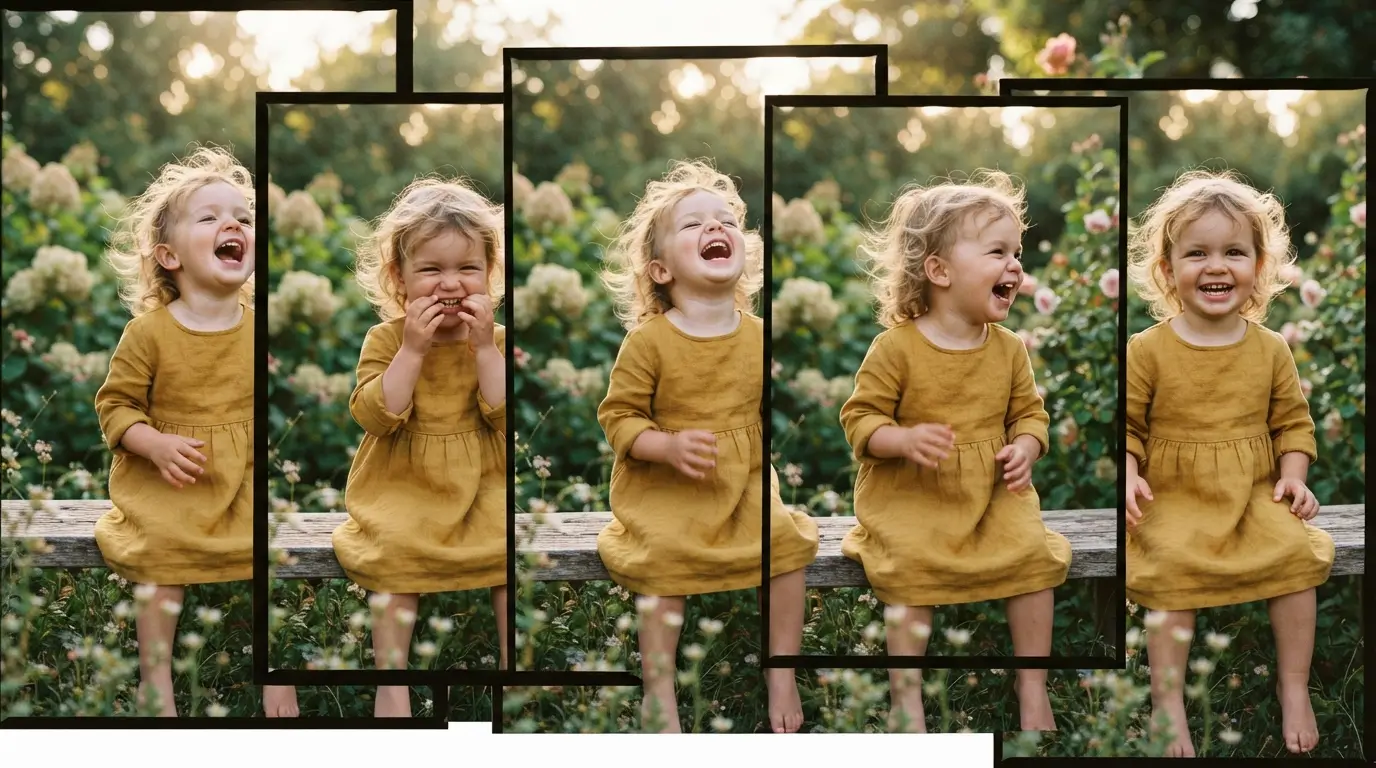
Babies move without warning. One second your daughter is smiling, the next she’s turned away or her expression changed. Burst mode lets you capture multiple frames per second so you can pick the perfect shot afterward instead of settling for one moment you didn’t quite catch.
Hold down the shutter button on your phone’s camera app to activate burst mode, then release. You’ll get a rapid-fire sequence of photos in less than two seconds. I can’t count how many times this saved me from missing a genuine laugh or milestone moment. It sounds lazy, but it’s actually the most efficient way to guarantee you capture real expressions instead of posed, awkward smiles. Review them later and delete the duds.
5. Get Down to Eye Level With Your Baby
The angle you shoot from changes everything. Standing above your baby looking down creates unflattering photos with weird perspective and washed-out lighting. Sitting or lying on the floor to match their eye level makes them look engaged, present, and real.
This simple shift in positioning transformed my photo library. Suddenly my baby’s expressions felt more intimate, and the background became less intrusive. You’re also more likely to catch genuine moments when you’re at their level instead of hovering above. It takes three extra seconds and zero money, yet it’s one of the most effective top rated phone camera tips for new parents who want authentic-feeling photos.
6. Turn Off the Flash and Embrace Shadows
Flash makes babies look washed out and creates harsh, unflattering shadows that ruin an otherwise decent photo. Your phone’s camera is actually sensitive enough to capture good images without flash in most home lighting situations. If the image seems dim, move closer to a light source instead of turning on flash.
Most phones let you disable flash by tapping the lightning bolt icon at the top of the camera screen. I disabled mine months ago and haven’t turned it back on once. The photos look softer, more natural, and the colors aren’t blown out. If you’re in a genuinely dark room, either find a window or come back later when light is better.

7. Use Gridlines to Compose Better Shots
The rule of thirds is a classic photography principle that makes images feel balanced and intentional. Your phone has gridlines built in that divide the screen into nine equal sections, and if you position your baby at the intersection of those lines instead of dead center, the photo looks more interesting.
Enable gridlines in your camera settings under Most phones have this option by default now. It sounds overly technical, but once you start using it, you can’t unsee how much better your compositions become. Your baby’s face or eyes should fall near one of those intersection points, not smack in the middle. This single change gets more photos I’m actually proud to display.
8. Edit Photos Strategically, Not Obsessively
Your phone’s built-in editing tools are genuinely good. Brightness, contrast, saturation, and warmth adjustments take 30 seconds and can rescue a photo that was almost perfect. But there’s a line between enhancement and making things look fake, and I’ve crossed it more than once.
Open any photo in your phone’s Photos app and tap Edit. Start with brightness and contrast, then adjust warmth if the lighting felt off. Boost saturation just slightly to make colors pop without looking overdone. Leave skin tone alone. Save your edited version as a copy so you always have the original. The goal is helping a good photo become great, not turning a mediocre shot into something that doesn’t look like your actual baby.
9. Create a System for Organizing Photos Later
You’ll take hundreds of photos. Seriously, hundreds. Without a system, they blur together, and you’ll miss the ones actually worth keeping. Create folders by month or milestone, or use your phone’s built-in album feature to organize as you go.
I started a habit of spending five minutes every Sunday deleting the obvious duds and starring my favorites. This keeps my phone from getting bogged down and ensures I can actually find the good shots when I want to print them or make a photo book. It sounds tedious, but it’s way easier than sorting through a thousand photos six months later when you’re trying to remember which month that milestone happened.
10. Don’t Stress About Getting Every Moment
Here’s the thing nobody tells new parents: the photo you didn’t take because you were too busy being present often ends up being the memory you treasure most. I have thousands of photos of my kids, but some of my favorite memories don’t have pictures at all.
Your phone is a tool for capturing memories, not a barrier between you and living them. Some of the best moments happen when you put the phone down. Your baby will be more comfortable, you’ll feel less pressure, and honestly, a mediocre photo of a genuine moment beats a perfect photo of a posed, tense situation every time.

FAQs
What phone camera settings should new parents change first?
Start with disabling flash, enabling gridlines, and switching to Portrait mode. Those three changes will instantly improve your photos without requiring any editing knowledge. Everything else builds on these basics, so master them before exploring more advanced settings.
How do I take better phone camera photos in low light?
Move closer to natural light sources like windows, avoid using flash, and increase brightness during editing afterward. Most newer phones have Night mode that automatically activates in dim conditions. Clean your lens first, since even small smudges make low-light photos look worse than they are.
Is editing really necessary for top rated phone camera tips to work?
No. Natural light and good composition do the heavy lifting. Editing should enhance, not save a photo. If a shot looks terrible unedited, editing probably won’t fix it. Focus on getting the capture right in the moment first, then edit sparingly to boost what’s already there.
Should I buy a professional camera instead of using my phone?
For most new parents, no. Your phone is faster, always with you, and genuinely capable of professional-quality photos. Professional cameras make sense if you’re a photography enthusiast or planning to shoot professionally, but for family memories, your phone does everything you need.
How often should I clean my phone’s camera lens?
Before every photo session, or at least once daily if you’re taking photos regularly. Babies create mess, and even invisible smudges affect image quality. Keep a microfiber cloth handy in your diaper bag so it takes three seconds instead of feeling like a chore.
Can I fix blurry baby photos after they’re taken?
Not really. Blur from motion or focus issues can’t be recovered through editing. Blur from a dirty lens is more fixable, but prevention (cleaning the lens) is easier than correction. Burst mode prevents missing sharp shots by giving you multiple options to choose from.
Conclusion
The best phone camera tips for new parents boil down to this: master the basics, prioritize natural light, and focus on getting the moment right instead of chasing perfect editing. You already have a powerful camera in your pocket, and these techniques unlock what it can actually do. Stop second-guessing yourself and start taking photos that make you genuinely excited to look back on them later.
Leave a Reply